If you only print shirts, you can stop reading. Simple mode in PrintGrid still works the way it always has, and your prices are correct.
This post is for the shops running screen print alongside embroidery, DTF, HTV, large format, or stickers. There's a pricing problem most tools — including the old version of PrintGrid — quietly ignored. This release fixes it.
The problem
When a shop runs more than one decoration service, every one of those services consumes the same shop overhead. Rent. Insurance. Utilities. Software. The owner's salary. The bookkeeper. None of that overhead actually lives with screen print. It lives with the shop.
But here's the trap most shops fall into: when you sit down to price an embroidery job or a DTF run, you cost the materials, you cost the labor, you mark it up, and you call it good. The overhead never enters the math. Meanwhile, your screen print prices — built off an hourly rate that was loaded for overhead — end up carrying the whole nut for the building.
That's not a screen print problem. Your SP rate is doing exactly what it's supposed to do. The problem is that your other services are getting a free ride. They feel profitable on paper because the overhead bill never shows up on their line.
The first time you actually do this math, it stings. Most shop owners discover their embroidery and DTF gross margins were lying to them for years.
Why "split overhead by revenue %" is a tempting wrong answer
The obvious instinct — and one I almost shipped — is to allocate overhead across services by their share of revenue. If embroidery brings in 30% of your revenue, embroidery eats 30% of your overhead. Clean. Tidy. Wrong.
One of my customers finally talked me out of it. His point, paraphrased:
"What if I do embroidery on a $300 jacket? That single job spikes my embroidery revenue and suddenly embroidery is 'using' more overhead — even though my embroidery machine ran for the same eight minutes it always does."
Revenue isn't a measure of resource consumption. A shop that does $50K of embroidery on premium goods doesn't burn more electricity than a shop doing $25K on blanks. Same machine, same operator, same rent.
When you allocate overhead by revenue percentage, you're punishing services that decorate expensive substrates and rewarding services that decorate cheap ones. That's not a pricing model. That's a coupon for stickers.
I went looking for who else had solved this for screen print shops specifically. Marshall Atkinson's "cost per impression" framework lives in the same neighborhood — it costs the press job by minute, not by dollar. There isn't a taught industry standard for revenue-share overhead allocation in screen print. There's a reason for that.
The honest fix: time-based overhead allocation
Every minute of shop time costs the same overhead. That's the foundational quantity. Take your monthly fixed costs, divide by your billable minutes, and you have a number — call it $X per minute — that represents your pure overhead burn rate.
Now apply it where it actually lands. Each service's pricing should include the overhead its time consumes. The embroidery machine ran for eight minutes? That job ate eight minutes of overhead. The DTF print took twelve minutes? Twelve minutes of overhead. The press job took a half hour? Thirty minutes of overhead — but that was already baked into your screen print hourly rate, so there's nothing to add.
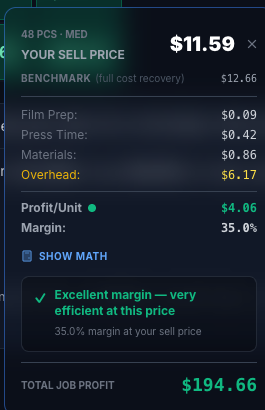
That's the move. Screen print is unchanged because SP's hourly rate was always carrying overhead correctly. The cost-plus services — embroidery, DTF, HTV, large format, stickers — gain an explicit overhead line on the cell tooltip. That line shows you exactly what each unit absorbed.
The result: your matrices for the other services come out higher than they used to. Not because PrintGrid is being greedy. Because they were under-priced before.
You can see the math work in the cell tooltip — Materials, Labor, Overhead, Markup — line by line. Nothing is hidden.
Shop Check: see what each service has to carry
Once overhead is in your prices, the next question is how much of the monthly bill each service is on the hook for.
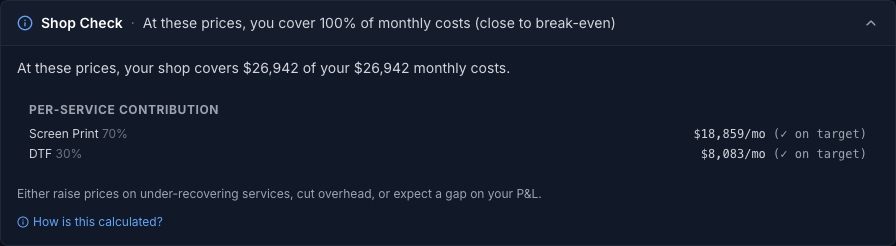
That's what the Shop Check panel is for. It sits below the matrix, takes your total monthly costs, and spreads them across your services by the revenue mix you entered. If screen print is 70% of your revenue and DTF is 30%, it shows how many dollars of the monthly nut land on each one.
Be clear on what it isn't. Shop Check does not read your matrix prices, so it can't tell you whether those prices cover your costs. And the revenue mix never changes a price. Your prices still run on time, exactly as described above. Shop Check is a way to look at the bill, not a verdict on your pricing.
What this means for your shop
Two scenarios.
Screen-print-dominant shops — if SP is 80%+ of your revenue and the other services are occasional, Simple mode is fine. Your overhead is already absorbed correctly. Don't over-engineer this.
Multi-service shops — if you've got real production volume in two or more services, flip to Multi-Service mode. Yes, your matrices for the non-SP services will go up. That's the math telling you what was already true. It's better to find out from a pricing tool than from a P&L.
Either way, Shop Check shows you what each service has to carry.
How to switch
In the sidebar footer, click the gear icon → Pricing Mode. Choose Multi-Service. You'll see a one-time explainer modal walking through what changed. Switch back any time — your data isn't touched.
That's it. The default is still Simple mode for everyone, including new users. Multi-Service is opt-in by design.
Open PrintGrid, flip it on, and look at what your matrices actually want to be.
If you've got questions, reply to the launch email if you got one, or hit me direct at ryan@printgrid.ink. Always happy to walk through it on a call.